
Why Platform Setup is the Foundation of Your Brokerage
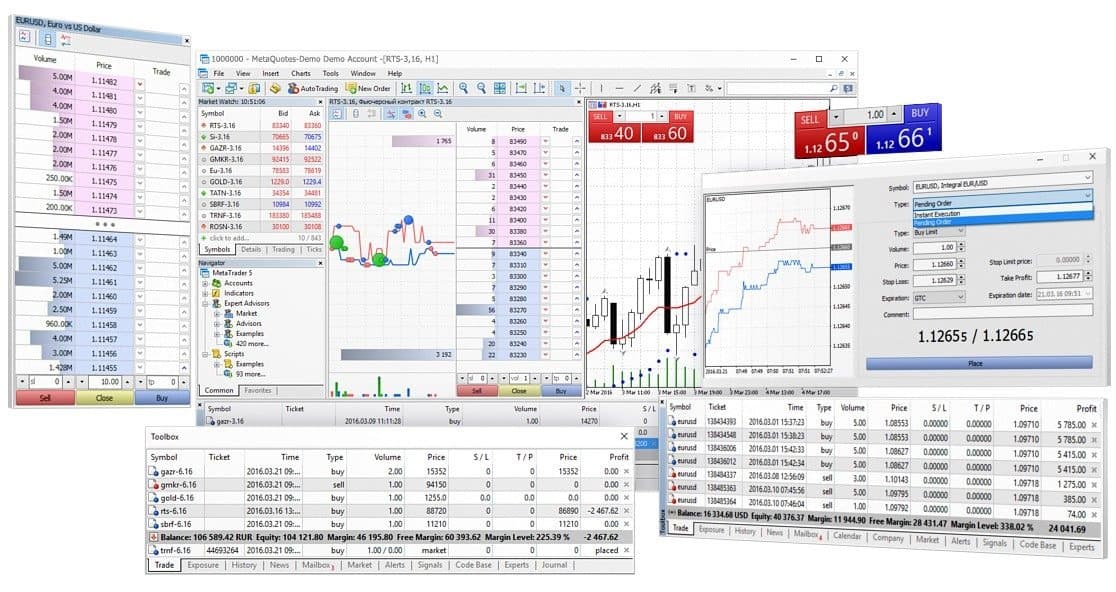
Launching a forex or CFD brokerage on MetaTrader 4 or MetaTrader 5 is significantly more complex than simply acquiring a platform licence. The way your MetaTrader environment is configured from day one determines your execution quality, your risk management effectiveness, your clients’ trading experience, and ultimately your brokerage’s profitability. A poorly configured platform creates problems that are difficult and costly to fix after launch – from execution issues and pricing discrepancies to risk gaps that expose your business to unexpected losses.
In this guide we walk through the key components of a professional MetaTrader platform setup – what needs to be configured, why each element matters, and what the most common mistakes are that brokers make when setting up their trading infrastructure.
Step 1 – Server Infrastructure and Installation
Before any platform configuration begins, you need a stable, reliable server environment to host your MetaTrader infrastructure. This is the foundation everything else is built on – and compromising on server quality at this stage creates problems that no amount of configuration can fix.
Server Requirements
MetaTrader servers have specific hardware and connectivity requirements that must be met to ensure stable operation under live trading conditions. Key considerations include:
- Dedicated server hardware with sufficient processing power and RAM for your expected client and instrument volume
- Low-latency connectivity to your liquidity providers – ideally co-located in the same data centre as your LP infrastructure
- Redundant network connectivity to eliminate single points of failure
- Appropriate backup and disaster recovery provisions
- Geographic location aligned with your primary trading sessions and client base
Server Components
A standard MetaTrader deployment consists of multiple server components that need to be correctly installed and configured to work together. These include the trade server, the data centre server for client connectivity, and various gateway components that handle connections to liquidity providers and external systems. Each component needs to be correctly sized and configured for your expected load.
Step 2 – Symbol and Instrument Configuration
Your instrument configuration is one of the most complex and consequential aspects of your MetaTrader setup. Every symbol you offer to clients needs to be correctly configured across a large number of parameters – and errors in symbol configuration are one of the most common sources of execution issues, pricing discrepancies, and client complaints.
Key Symbol Parameters
For each instrument on your platform, you need to correctly configure:
- Contract specifications – contract size, tick size, tick value, and currency – these determine how positions are calculated and how profit and loss is reported to clients
- Margin requirements – the margin percentage or fixed margin required to open and maintain positions in each instrument
- Swap rates – the overnight financing cost applied to positions held beyond the daily rollover – these need to be updated regularly in line with your liquidity provider’s swap schedule
- Trading sessions – the hours during which each instrument is available for trading – incorrectly configured sessions lead to trading being available when markets are closed
- Spread settings – the markup applied to your LP’s raw prices before they are shown to clients
- Execution mode – whether the instrument uses instant execution, market execution, or exchange execution
- Price feeds – which liquidity provider feed each symbol sources its prices from
Common Symbol Configuration Mistakes
The most common symbol configuration errors we encounter when auditing broker platforms include incorrect tick values that cause profit and loss calculation errors, swap rates that have not been updated following LP changes, trading sessions that do not match actual market hours, and margin requirements that do not reflect the broker’s intended risk parameters. Any of these errors can result in client disputes, financial losses, or regulatory issues.
Step 3 – Client Group Configuration
Client groups are one of the most powerful and most misunderstood features of the MetaTrader platform. Groups allow you to apply different trading conditions to different segments of your client base – giving you precise control over the trading environment each client type experiences.
Why Group Configuration Matters
A well-designed group structure allows you to:
- Offer different leverage levels to retail and professional clients in line with regulatory requirements
- Apply different spread markups to different account types – for example tighter spreads for premium accounts
- Separate Islamic or swap-free accounts with zero swap rates from standard accounts
- Implement different margin call and stop out levels for different client categories
- Route orders from different client groups through different execution paths – for example routing professional clients A-book and retail clients B-book
- Apply different execution settings to different account types
Most brokers launch with a basic group structure and add complexity over time as their business evolves. However getting the foundational group architecture right from the start avoids costly restructuring later.
Step 4 – Liquidity Bridge Configuration
For brokers operating an A-book or hybrid execution model, the liquidity bridge is the critical infrastructure that connects your MetaTrader platform to your liquidity providers. The bridge handles order routing, pricing aggregation, execution rules, and exposure management in real time. A poorly configured bridge leads to execution failures, pricing gaps, and exposure mismatches that directly impact your brokerage’s financial performance.
Key Bridge Configuration Elements
- Symbol mapping – connecting each MetaTrader symbol to the corresponding instrument at your liquidity provider
- Execution rules – defining how orders are processed including slippage tolerance, partial fill handling, and rejection behaviour
- Pricing rules – configuring how LP prices are processed and marked up before being shown to clients
- A-book and B-book routing – defining which client groups and order types are routed to the LP and which are internalised
- Maker and taker adapter configuration – setting up the connections between your bridge and your LP’s trading infrastructure
- Session configuration – aligning bridge trading sessions with instrument availability
Step 5 – Risk Parameter Setup
Your risk parameters define the boundaries within which your clients can trade and the controls that protect your brokerage from excessive exposure. Getting these right from launch is one of the most important things you can do to protect your business.
Key Risk Parameters to Configure
- Leverage limits – the maximum leverage available to each client group across each instrument category
- Margin call level – the equity to margin ratio at which clients receive a margin call warning
- Stop out level – the equity to margin ratio at which positions are automatically closed to prevent negative balances
- Maximum position size – limits on the size of individual positions or total exposure per client
- Negative balance protection – ensuring clients cannot lose more than their account balance
- Exposure limits – defining acceptable net exposure thresholds that trigger hedging activity
Step 6 – Plugin Configuration and Testing
Most professional MetaTrader deployments include one or more plugins that extend the platform’s functionality – from risk management tools and reporting systems to PAMM solutions and bonus management systems. Each plugin needs to be correctly installed, configured, and tested before go-live to ensure it operates as intended without affecting platform stability.
Plugin conflicts and misconfiguration are a common source of platform instability and execution issues. Any plugin installation should be followed by thorough testing in a demo environment before being applied to live trading infrastructure.
Step 7 – Market Holidays and Trading Session Setup
Trading sessions and market holidays need to be correctly configured for every instrument on your platform. When sessions are incorrectly set, trading may be available when the underlying market is closed – resulting in stale pricing, execution failures, and client complaints. Market holidays need to be pre-configured in advance to prevent trading during scheduled market closures.
For brokers with large instrument ranges covering multiple asset classes – forex, indices, commodities, equities, and crypto – managing sessions and holidays across hundreds of symbols is a significant ongoing operational task. Tools like our Holiday Setter automate this process, allowing brokers to configure holidays across all symbols simultaneously using a simple CSV upload.
Step 8 – Pre-Launch Testing
Before going live with client funds, your MetaTrader platform needs to be thoroughly tested across all its configured components. This includes:
- Pricing verification – confirming that prices are correct, spreads are as intended, and price feeds are stable
- Execution testing – verifying that orders are executed correctly, routing is working as configured, and slippage is within expected parameters
- Margin and profit and loss calculation testing – confirming that margin requirements and profit and loss calculations are correct for all instrument and account type combinations
- Session testing – verifying that trading sessions open and close correctly for all instruments
- Plugin testing – confirming that all installed plugins operate correctly under live-like conditions
- Connectivity testing – verifying that all server components, LP connections, and client-facing infrastructure are stable under expected load
The Ongoing Configuration Challenge
It is important to understand that MetaTrader platform setup is not a one-time task. Once your platform is live, it requires continuous ongoing attention to remain correctly configured. Swap rates need to be updated weekly. Market holidays need to be pre-configured monthly. Margin requirements shift. New instruments need to be onboarded. Daylight Saving Time changes need to be managed twice a year. Symbol sessions need to be adjusted as market hours evolve.
Many brokers underestimate this ongoing operational burden when they launch – and find themselves spending significant time and resources on routine platform maintenance that distracts from their core business activities. This is one of the primary reasons brokers choose to outsource their platform management to a specialist team.
How Broktinger Can Help
At Broktinger, our team has spent 15+ years setting up and managing MetaTrader 4 and MetaTrader 5 platforms for brokers of all sizes. We offer a range of services and tools designed to make platform setup and ongoing management faster, more accurate, and less operationally demanding:
- Our MetaTrader Support service covers everything from initial platform setup through to ongoing maintenance, monitoring, and day-to-day configuration management
- Our Dealing Desk service provides professional dealing coverage to manage your platform’s execution quality and risk exposure on a 24/5 basis
- Our Risk Management service helps you design and implement the right risk parameter framework for your business model
- Our Liquidity Bridge Support service ensures your bridge configuration delivers optimal execution quality and LP connectivity
- Our Swap Changer tool automates weekly swap rate updates across all instruments
- Our Holiday Setter tool automates market holiday configuration across all MT4 symbols
- Our Margin Changer tool allows instant margin updates across all symbols and groups
Once your MetaTrader platform is set up and running, many brokers look to connect third-party applications – whether a custom web trading terminal, a mobile app, or an analytics tool – directly to their MT4 or MT5 server. Read our guide on how to connect a third-party platform or build your own front-end on MetaTrader to understand how this works and what it requires.
Whether you are setting up a new MetaTrader platform from scratch or looking to audit and optimise an existing setup, get in touch with our team for a free consultation. We will assess your requirements and show you exactly how we can help you build and maintain a professional, high-performance MetaTrader environment.