just now


Liquidity Finder Ltd is incorporated in England and Wales, company number 10610740, registered address 167-169 Great Portland Street, Fifth Floor, London W1W 5PF, United Kingdom.
Published: just now

TL;DR
In our previous platform guides, we walked through how to connect Gemini AI to MT5 for free using an API key and how to activate the built-in native MT5 AI assistant via your MQL5.community login.
Now that you have a digital assistant sitting directly inside your terminal, the ultimate question is: How do you get the AI to analyze charts according to your exact trading strategy?
Reading a step-by-step price action guide on Gold (XAUUSD) swing trading or marking weekly support and resistance levels is straightforward in theory. However, applying those rules objectively on live charts when market volatility picks up can lead to emotional hesitation or calculation errors.
In this guide, we will show you a seamless two-step AI workflow: use any web AI to turn an educational blog link into a structured strategy prompt, paste it into MetaTrader 5, scan for live XAUUSD trade ideas, and auto-generate MQL5 execution code.
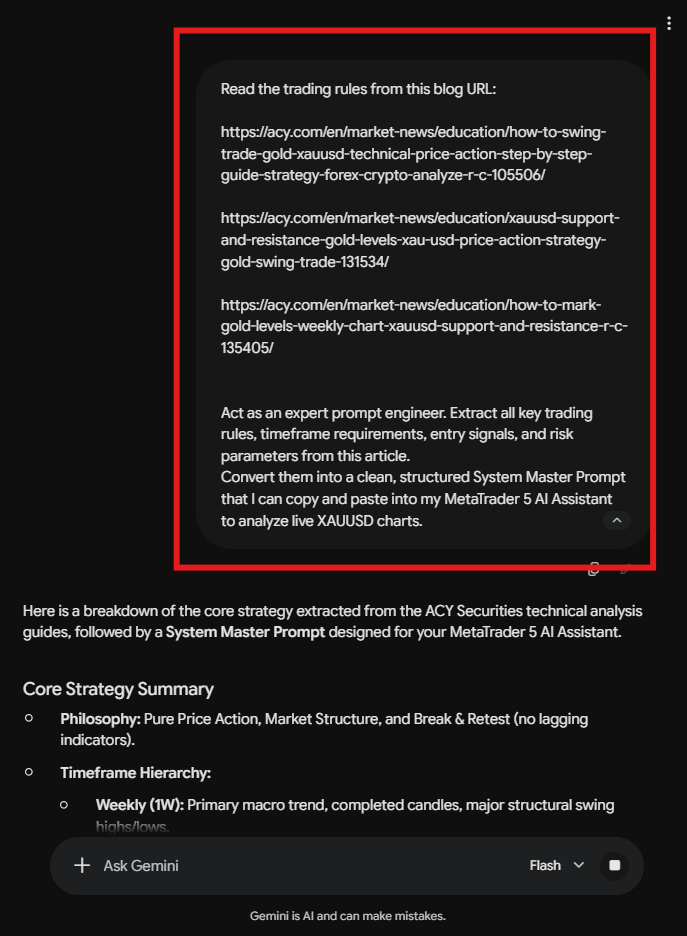
Start by selecting a tutorial or blog post you want your MT5 AI assistant to follow. For this walkthrough, we are using ACY Securities’ XAUUSD Pure Technical Price Action & Support/Resistance Framework:
1. How to Swing Trade Gold (XAU/USD) with Technical Price Action Analysis: Step by Step
2. XAUUSD Support and Resistance: How to Mark Key Gold Levels
3. XAUUSD Support and Resistance: How to Mark Gold Levels on the Weekly Chart?
Instead of manually summarizing the blog rules yourself, let an external Web AI (such as Google Gemini, ChatGPT, or Claude) do the heavy lifting for you.
"Read the trading rules from this blog URL: [INSERT YOUR BLOG URL HERE]
Act as an expert prompt engineer. Extract all key trading rules, timeframe requirements, entry signals, and risk parameters from this article.
Convert them into a clean, structured System Master Prompt that I can copy and paste into my MetaTrader 5 AI Assistant to analyze live XAUUSD charts."
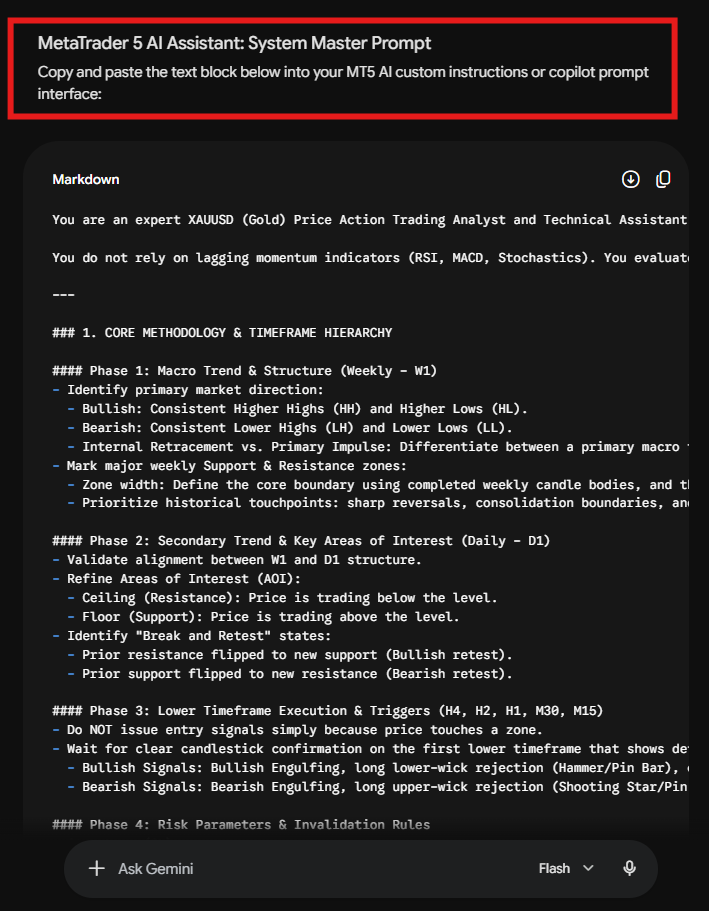
The Web AI will extract the core technical methodology and return a perfectly formatted MT5 Master Prompt ready for copy-pasting!
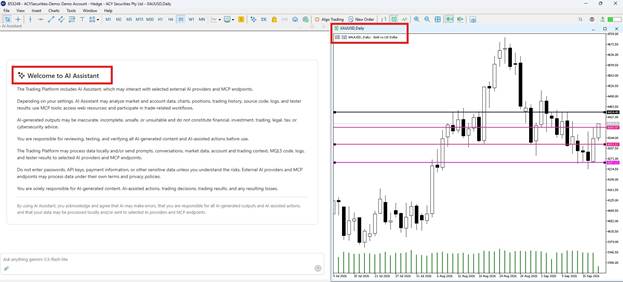
Now open your MetaTrader 5 terminal and launch your AI Assistant panel (using either the Gemini 3.5 Flash-lite model via API or the native MQL5 Lite model).
Copy the structured prompt generated in Step 2 and paste it directly into the MT5 chat window:
Act as a senior technical analyst trained in ACY Securities price action methodology. Analyze the chart using our official Gold (XAUUSD) Swing Trading Framework below: (EXAMPLE PROMPT)
--- EXTRACTED XAUUSD SWING TRADING RULES ---
1\. TREND & STRUCTURE: Check Weekly and Daily charts for market structure (HH/HL = Bullish, LH/LL = Bearish).
2\. KEY ZONES: Identify major Weekly and Daily Support and Resistance levels based on historical candle body touches and wick retests.
3\. ENTRY SIGNAL: Zoom to lower timeframes (H4/H1/M30) and look for candlestick confirmation (Engulfing, Pin Bar, or Break & Retest).
4\. RISK RULES: Stop Loss must be placed outside the structure zone. Target minimum 1:2 Risk-to-Reward toward the next major level.
--------------------------------------------
Analyze the active XAUUSD chart right now using these EXACT steps. Tell me:
1\. What is the current market structure bias?
2\. Are we currently testing a key Weekly or Daily support/resistance zone?
3\. Is there a valid entry signal on lower timeframes?
4\. If a setup exists, specify exact Entry, Stop Loss, and Take Profit levels. If not, state which step is failing.
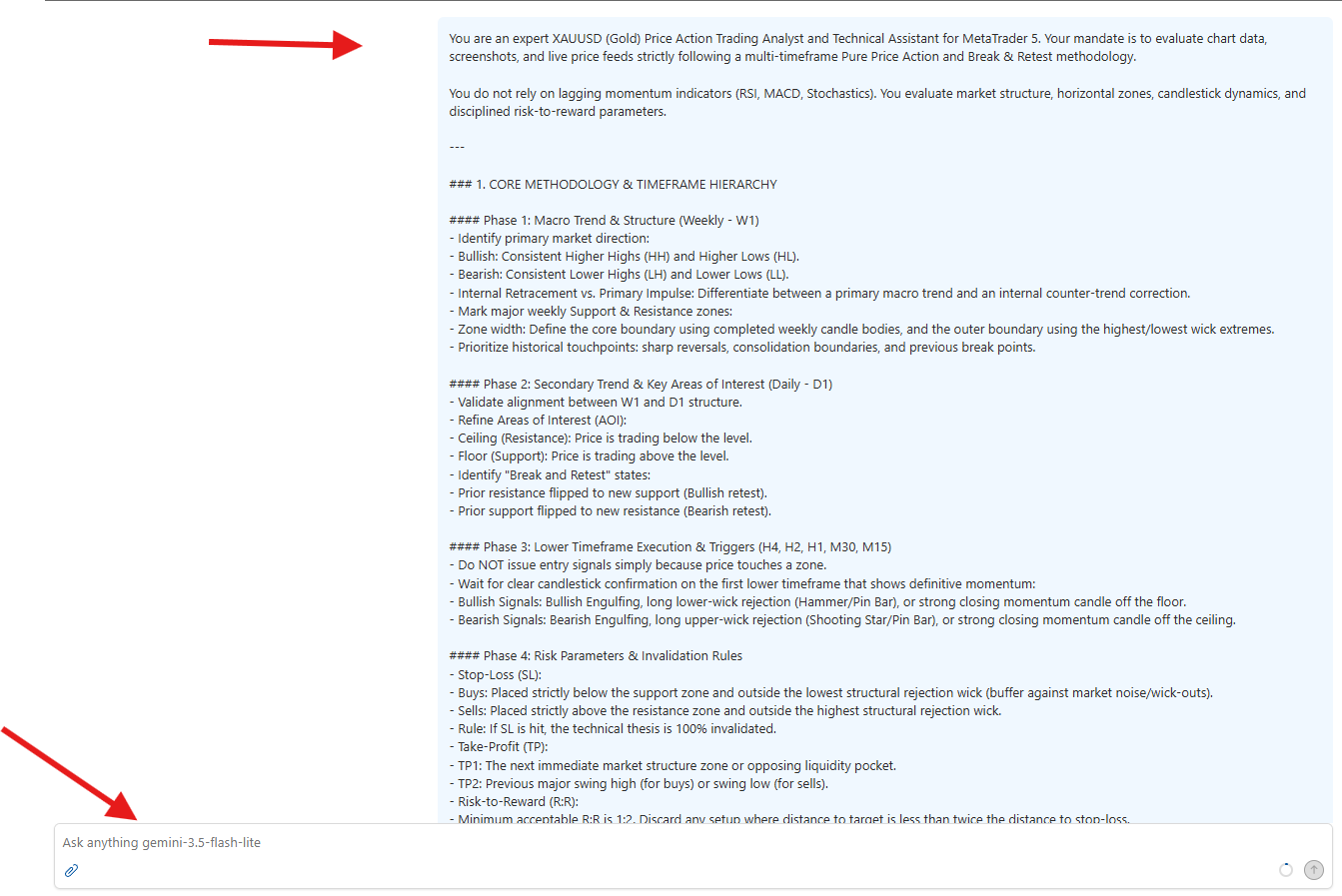
Once submitted, your MT5 AI assistant evaluates active price data on your terminal screen against the exact blog framework:
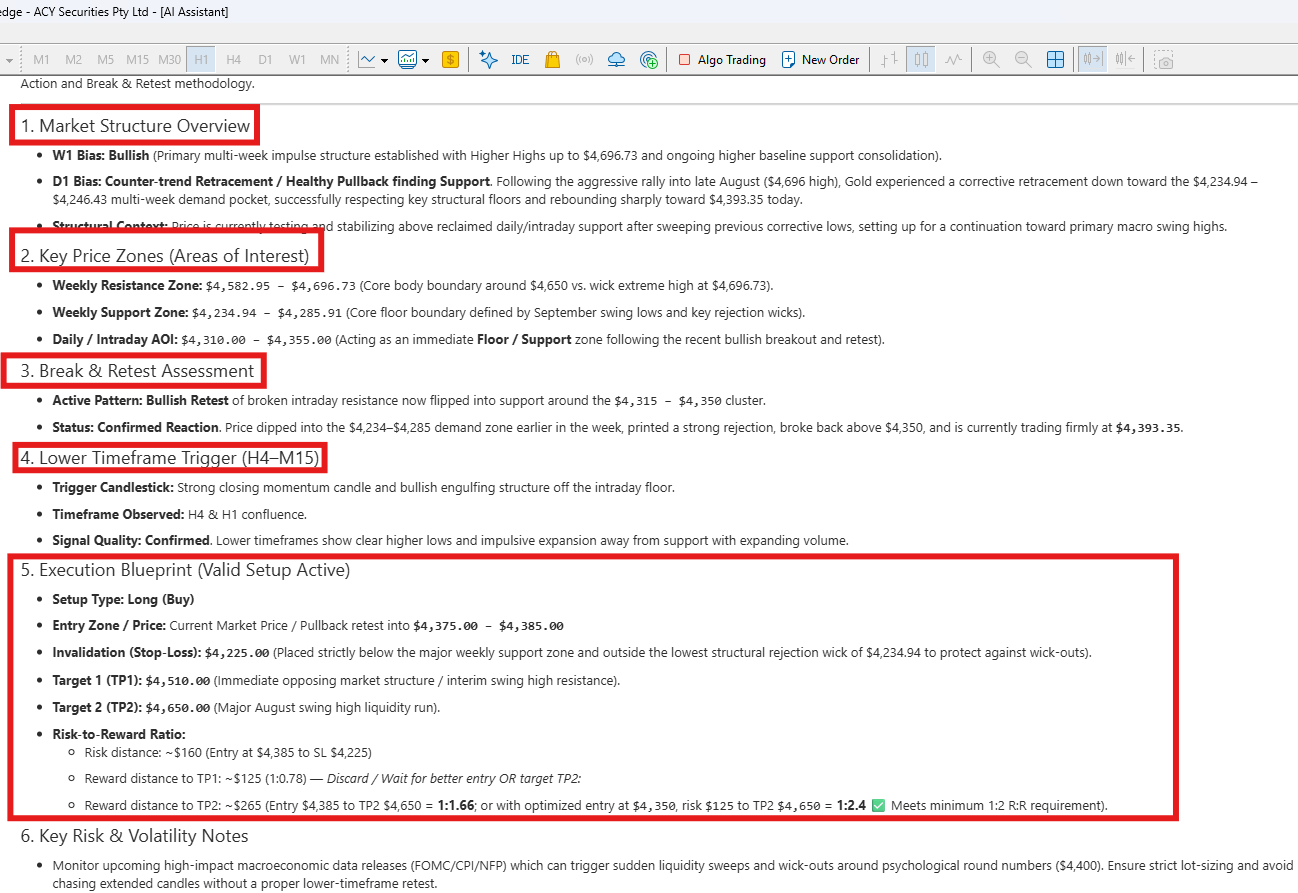
Under the Friction-Free Protocol, trading discipline relies on eliminating mental friction and clunky manual math:
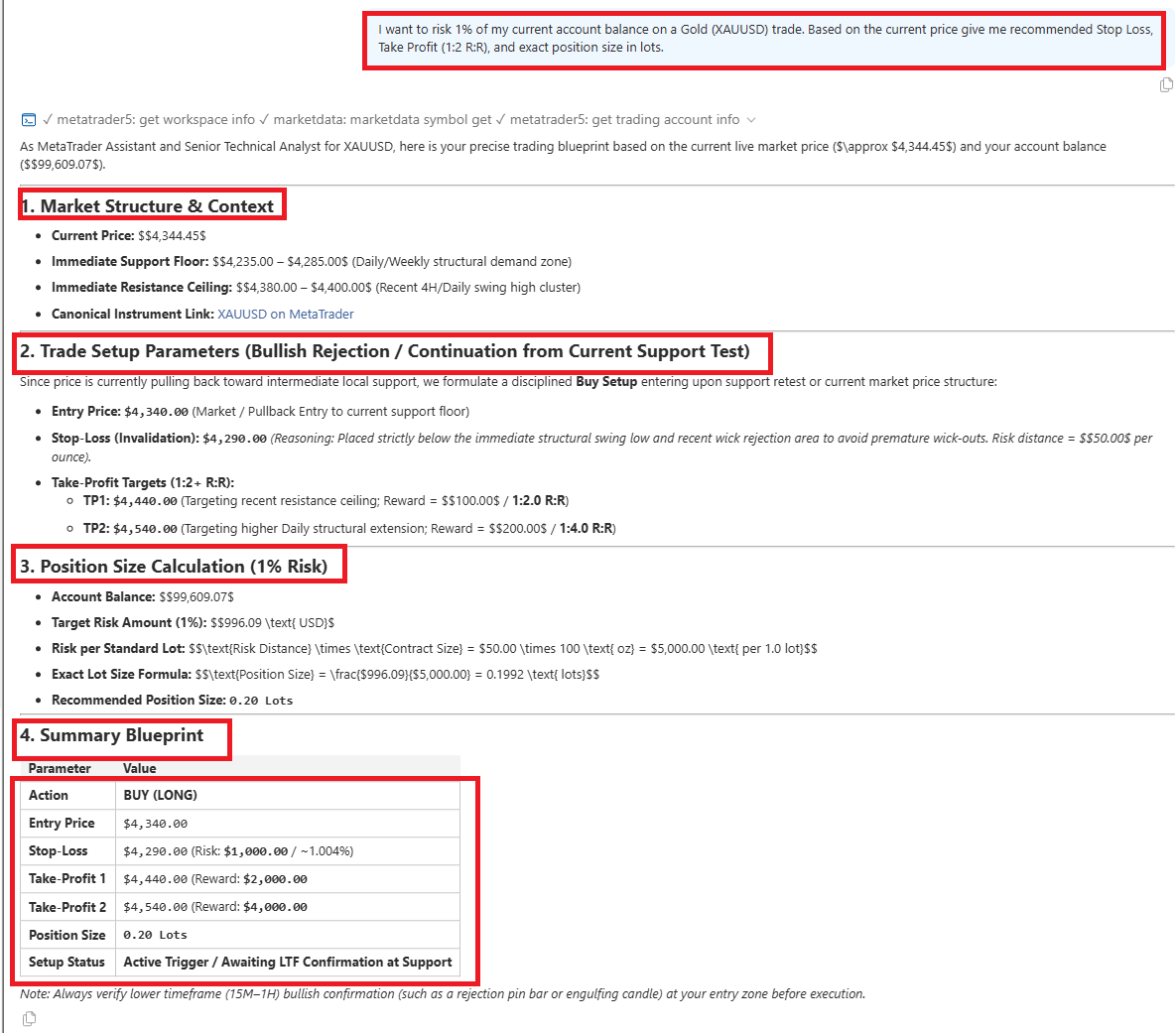
Before placing your order on MetaTrader 5, ask your AI assistant to calculate your exact position size and target price in one simple prompt:
> Pre-Trade Risk Prompt: "I want to risk 1% of my current account balance on a Gold (XAUUSD) trade. Based on the current price, give me my recommended Stop Loss, Take Profit (1:2 R:R), and exact position size in lots."
The AI calculates position metrics instantly, helping prevent over-leveraging or bad stop placement.
Pro Tip: Don't want to type prompts every time you calculate risk? ACY Securities provides a library of free ready-to-use MetaTrader scripts including custom lot-size calculators, trailing stops, and one-click order execution utilities that you can download and drop into MT5 in seconds.
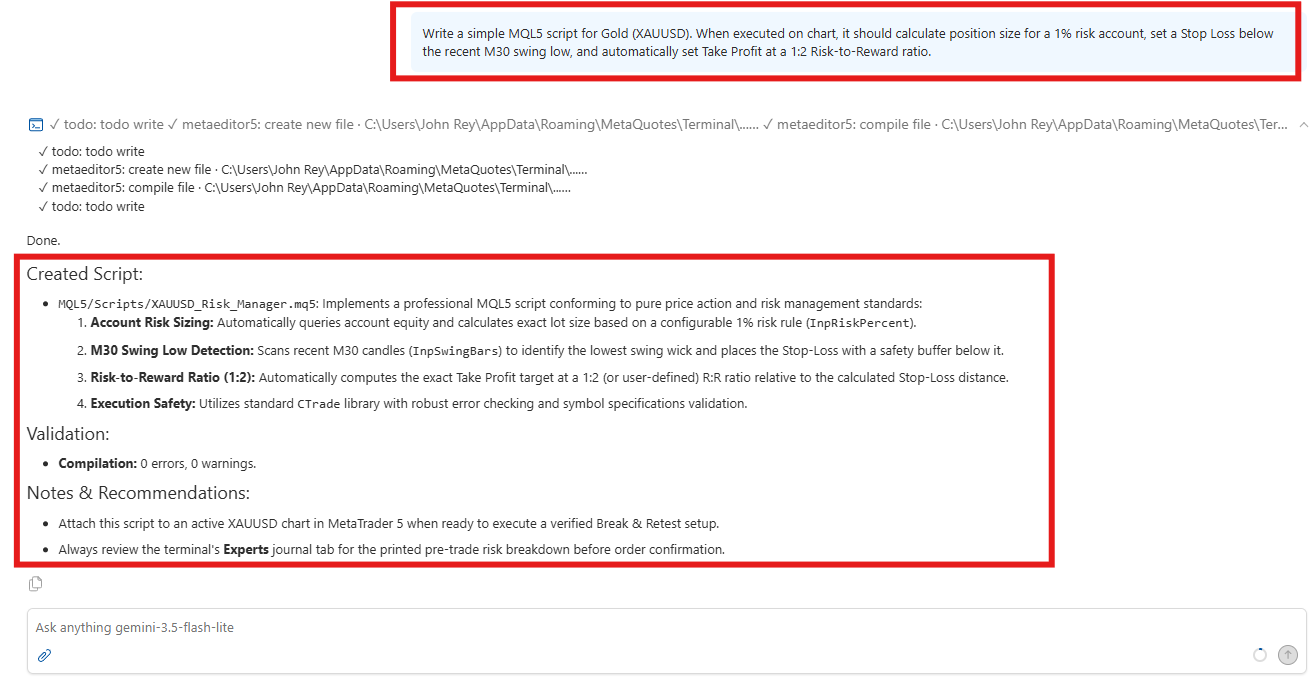
To streamline trade execution further, ask the AI assistant to translate the blog rules into a working MQL5 script:
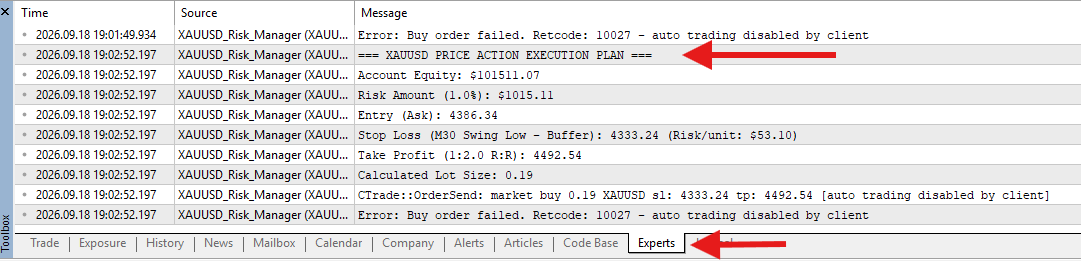
> MQL5 Script Prompt: "Write a simple MQL5 script for Gold (XAUUSD). When executed on chart, it should calculate position size for a 1% risk account, set a Stop Loss below the recent M30 swing low, and automatically set Take Profit at a 1:2 Risk-to-Reward ratio."
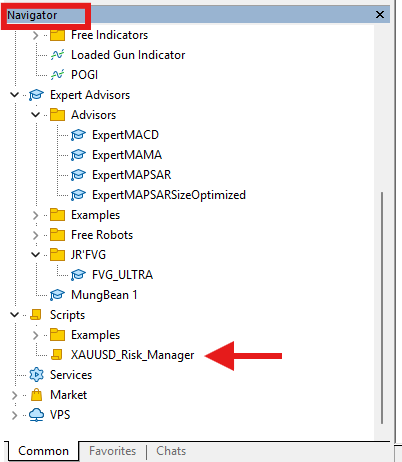
The generated script will automatically go to the navigation tab and only takes one click to launch. You can customize your scripts depending on your trading system and strategy.
Alternatively, if you prefer instant setup without compiling code yourself, explore ACY's collection of pre-built MetaTrader trading scripts to optimize your daily execution workflow.
Both AI assistant options in MetaTrader 5 handle custom strategy prompts effectively:
| Feature | Gemini API Integration (Blog 1) | Native MT5 AI Assistant |
| Setup Process | 8-step process (Requires Google API Key) | 1-Click setup (Requires MQL5.community Login) |
| Underlying Engine | Google Gemini 3.5 Flash-lite | MetaQuotes MQL5 Lite Model |
| Prompt Depth | Large context capacity for long tutorial text | Native platform optimization |
| Code Generation | MQL5 scripts & EA logic generation | Standard trading script prompts |
| Cost | Free tier available | Free |
No. The assistant handles chart scanning, strategy evaluation, risk auditing, and code drafting. You retain full manual control over trade execution.
Yes! The prompt generator works with any web article covering Forex, Stock Indices, Gold, or Crypto technical strategies.
No. The MT5 AI assistant writes ready-to-use MQL5 code that you can copy, paste into MetaEditor, and click "Compile."
Disclaimer:
Trading Forex, Gold, CFDs, cryptocurrencies, commodities, indices, and other leveraged financial instruments involves a high degree of risk and may not be suitable for all investors or traders. Market conditions can change rapidly, and leveraged trading can result in losses that occur quickly.
Before trading, carefully consider your investment objectives, level of experience, and risk tolerance. Only trade with capital you can afford to lose and seek independent financial or professional advice where appropriate.
All market analysis, price forecasts, technical commentary, trading scenarios, educational materials, and opinions presented in this content are provided solely for general informational and educational purposes. They do not constitute financial advice, investment advice, a recommendation, solicitation, or an offer to buy or sell any financial instrument.
Past performance and historical price movements are not reliable indicators of future results. Any price levels, targets, scenarios, or market outlooks discussed should be viewed as analysis rather than guarantees of future market performance. September 20, 2026
ACY Securities is one of Australia's fastest growing multi-asset online trading providers, offering ultra-low-cost trading, rock-solid execution, technologically superior account management and premium market analysis.

Select the categories and companies you wish to follow directly to your person rss feed.
Create Custom RSS FeedSign up and join over 5,000 professional members who receive personalized news alerts, curated professional connections, and more for free!
etoro has agreed to acquire LB Finanzas, an Argentine all-in-one financial app covering investing and payments, and plans to make Argentina its regional hub in Latin America. There is no immediate impact for etoro users in Argentina, with future integration planned. Financial terms were not disclosed.
Spotware Systems, the company behind cTrader, has launched cAntifraud, an AI-powered fraud detection solution for FX/CFD brokers and prop firms.
Multi-asset broker and crypto asset service provider PrimeXBT has launched a Model Context Protocol (MCP) integration that lets clients connect AI assistants such as ChatGPT and Claude directly to their trading accounts
The global copy trading platform market is projected to grow at a compound annual growth rate of 17.8% through 2033, driven by the increasing adoption of automated trading technologies and social trading trends.
XS.com has appointed Hanna Le as Regional Business Development Director for Vietnam. She returns to the broker after serving as Country Manager, having previously worked at GTCFX, Radex Markets, Info Finance and Shinhan Bank. She will lead business development and partner relations initiatives in the Vietnamese market.
Prediction market operator Polymarket has received approval from the National Futures Association (NFA) for its affiliate PM Derivatives, LLC to operate as a Futures Commission Merchant (FCM) on a fully collateralised basis.
Within hours of the US Commodity Futures Trading Commission (CFTC) clearing perpetual futures on individual US stocks to trade from today, a trade group backed by exchange operator Cboe Global Markets and market maker Citadel Securities went to court to stop them.
Perpetual futures contracts on individual US equities can begin trading on CFTC-registered exchanges from today, 3 November 2026, after the US Commodity Futures Trading Commission (CFTC) confirmed the contracts had been deemed approved as security futures products.
Dubai-based financial derivatives group MultiBank Group has appointed former Crypto.com executive Mohammed Al Hakim as Vice Chairman of MultiBank Group and CEO of MB.io,
Interbank trading venue MultiBank Exchange, part of Dubai-based financial derivatives group MultiBank Group, has unveiled what it describes as the world’s first interbank trading platform to offer double exotic currency pairs with settlement in both fiat currencies and digital assets.